Categories
Uncategorized

What on earth is KCP and why should I be very, very excited about it?

When people ask me what I do for a living I give up trying to explain what it is and just say ‘software’, at which point their eyes glaze over and the conversation shifts to weather, which politician has done what insanely hypocritical thing and whose round it is.

And the reason I find it hard to elucidate what I do for a living is that it’s hard to explain just what a tech-mad solution architect does; I stay at just-behind the cutting edge of open source software, one foot in the camp of supported versions (the Red Hat model) and the other constantly dipping my toes into the ‘new stuff’ that is coming.

When Docker first came out my thoughts were, in chronological order, ‘I don’t understand this’, ‘that’s a nice little idea’, ‘that’s a stunning idea’, that’s the future’ in that order (although ‘I don’t understand this’ did pop up a lot more).

And then Kubernetes came on the scene. And with a good deal of clever forethought, Red Hat and the Open Source communities dropped their ‘super-controllers’ around Docker and other segmentation/containerisation technologies, and jumped wholeheartedly on the Kubernetes bandwagon (or should that be sailing ship, keeping true to the Greek taxonomy for the project).

If you’ve read any other of the posts you know my day-to-day job revolves around knowing OpenShift inside and out, from a perspective of why it is Enterprise strength etc etc. And part of that role has led me to get an understanding of what Kubernetes actually is.

I’ve blogged on the fundamentals of Kubernetes before, but I’m going to reiterate my simple explanation because it is completely relevant to what I want to enthuse about in the post, namely a little prototype called KCP that does something……..brilliant.

So, Kubernetes is a Container Orchestration system. And that is the worst description I will ever type around Kubernetes; saying that is like saying a Ferrari is four tyres and a chunk of metal. It describes it perfectly while missing the point; you don’t buy a Ferrari for four tyres and a chunk of metal. You buy a Ferrari (if you’re not a software engineer/solution architect and can actually afford one) because of it’s elegance, it’s sophistication, and the crafting and engineering that make it much more than four tyres and a chunk of metal.

So, Kubernetes is, at its heart, a reconciliation based state machine. In actuality it’s two systems; one is a ‘virtual’ system, comprising the creation and manipulation of ‘objects’, and one is a physical one, where the representations of the virtual objects are instantiated and kept compliant by ‘drones’ driven by changes in the object model.

In English; when you interact with a Kubernetes system you challenge it to keep a set of required states. Kubernetes balances the physical instantiation of the Objects with the required state of the Objects held centrally.

At its heart that is it; the map of Object model to state is kept centrally (in etcd) and manipulated via a control plane, where the Objects have their own dedicated controllers whose job is to task physical instantiators (the kubelets that live on the Worker nodes) to realise and keep compliant the required state.

If the physical instantiations change, i.e the Pod fails, then the controller, in tandem with the Kubelet, will try and restore the required state. The lovely thing about this is the disconnect; the control plane owns the intended Object state, the Kubelets resolve and report.

I have digressed but I hope you get the point; Kubernetes is a brain and a set of physical points that are disconnectedly ‘fire and forget for now’ updated, then respond with state changes to the brain which decides if the state has been resolved or not.

The thing is this; it’s brilliant and it is 100% linked to Containers/Pods. The Kubelets just handle the orchestration and health of Pods on their node. And this is where KCP comes in.

So KCP is effectively the brain unhindered by the physicality of Kubernetes. And that’s a great think; it’s the control plane with all its brilliant ability to reconcile and maintain Object state, but it is not limited to the physicality of orchestrating Pods.

And this is completely my take from my understanding of the Kubernetes mechanisms and what I’ve seen from the KCP project.

Why is this brilliant? Because it means you can use that disconnected two step reconciliation approach for anything you can write an end controller for.

To me the goal of KCP is to provide that for any type of system that can be reached; imagine a pseudo-kubelet that provides orchestration over, say, a set of autonomous robots. You will be able to use KCP to control, reconcile and ensure compliance of the end state of the robots.

This disconnection of the ‘brain’ side from the physical realisation side means the sky is literally the limit in terms of what you could eventually control with a KCP. Anything that requires a defined state and a compliance can be architected to behave like a Kubelet, and then controlled by KCP.

I really like that idea – the KCP project is very young and is currently just a prototype and a (comprehensive) list of targets, but my gut says it will be a very interesting thing to follow.

The current git repo for the project is at https://github.com/kcp-dev/kcp and the goals/roadmap is at https://github.com/kcp-dev/kcp/blob/main/GOALS.md – have a read and see what you think…
Categories
Uncategorized

Quarkus and Kube, a match made in heaven….

I love OpenShift. There, said it. It appeals to my inner geek, the combination of sleek UI and the ability to just create stuff, as opposed to fumbling around for dev kit and all that infrastructure ‘fun’. I like the nature of Kubernetes; I preach about the object model over-enthusiastically to any customer/techie that will listen, but I’ve always had a problem working programmatically with it.

What I mean by that is the interactions I have had with OCP and K8S have always been via the command line (oc or kubectl) or the UI; I was a developer for a long, long time and my weapon of choice is JAVA. There’s very little I can’t do once you give me a JVM and an editor, but I’ve never been able to link the two worlds together comfortably.

I found a great blog (courtesy of LinkedIn of all places) by a fellow Red Hatter who had modernised (yeah, it’s brand newish technology but every-changing) a previous example of talking directly to an OpenShift cluster via the Fabric8 API. I found it intriguing because not only did I show connectivity (via the Kubernetes client) but also the basic mechanics of writing a Custom Controller/Operator.

This blog is available at https://blog.marcnuri.com/fabric8-kubernetes-java-client-and-quarkus-and-graalvm and I highly recommend giving it a read. It inspired me to revisit my previous attempt (stale for two years) and recreate it in Quarkus; my intention was to finally get a programmatic handle into OpenShift.

In this blog I’ll walk you through setting it up and then you can play with it; my intentions was to give myself a foundational example that offered a RESTful interface to some visibility of the target cluster. I built the application using Intellij IDEA2 which gave me some headaches (hint – if you change a pom.xml file remember to press the little ‘update dependencies’ button that appears, almost hidden, next to the multitude of syntax errors that appear).

The code for this example is freely available at https://github.com/utherp0/quarkkubeendpoints

So, to start I went to the Quarkus site and used the fantastic feature they have to scaffold some code; I chose the RESTEasy framework and added the ‘OpenShift Client’. This is really cool; it adds the components to the POM file you need for using the Fabric8 OpenShift client API but also adds the ability, via the @inject annotation, to directly inject an existing authorised client.

Changing the name and package, of course….

In English what it does is lift the auth token stored in the kube.config and uses that directly; it does mean, for the app to function, you must have pre-logged on to an OpenShift cluster. My next additions will be to add the ability to pass authentication information in and then construct an object of type OpenShiftClient.

The example uses the standard Quarkus approach of building via Maven; I had to coax some changes to get it to behave the way I wanted. The first was I added this to the applications.properties (Quarkus is great in that all of the -Dx=y params can be predefined, and conveniently forgotten about, in the applications.properties file.

quarkus.kubernetes-client.trust-certs=true
quarkus.package.type=uber-jar

The top line is me being lazy; all comms to the OCP cluster are via https and having had a nightmare earlier in my career trying to setup .jks (‘jokes’ comes close) cert store stuff in JAVA I now just take the insecure approach; not good for production of course, but fine for prototyping.

The second is again for simplicity for me. I like a fat JAR with all the required dependencies in there. Normally I have to faff around with the build component of the pom file but Quarkus already has the components, you just need to set that package type and it generates a standalone runnable ‘runner’ JAR.

I also messed up the pom a bit, so had to craft the dependencies myself; to use the RESTeasy and OpenShift stuff I added the following. I also added the Kubernetes Client but I’ll discuss that in a moment.

    <dependency>
      <groupId>io.quarkus</groupId>
      <artifactId>quarkus-kubernetes-client</artifactId>
    </dependency>
    <dependency>
      <groupId>io.quarkus</groupId>
      <artifactId>quarkus-resteasy</artifactId>
    </dependency>
    <dependency>
      <groupId>io.quarkus</groupId>
      <artifactId>quarkus-openshift-client</artifactId>
    </dependency>

It took me a while to actually write and get the app to work though, partly because I went down the KubernetesClient route first. The example in the blog I linked to above uses the Kubernetes Client to pull the namespace list and then sets up a controller/listener looking for changes to the Node objects, outputting the Pods that are running on any (new) Nodes that are added to the Cluster.

I really like the event based nature of that example but I wanted something a little more simple so I could understand the mechanics. My app is an endpoint that has optional parameters for a *Project* name (which is why I needed the OpenShiftClient, as Projects don’t exist in the Kubernetes Object space) and an optional parameter which allows the service to list all the projects the configured logon can see.

This is where the code gets delightfully simple; in the old days I’d write an HttpURLConnection object and marshal/handle the call myself; using the RESTeasy stuff means I can annotate out a lot of the handcrafted functionality, particularly around converting the auth token to a client connection (done via the @inject by the Quarkus OpenShift stuff), and handling the endpoint/query parameters programatically.

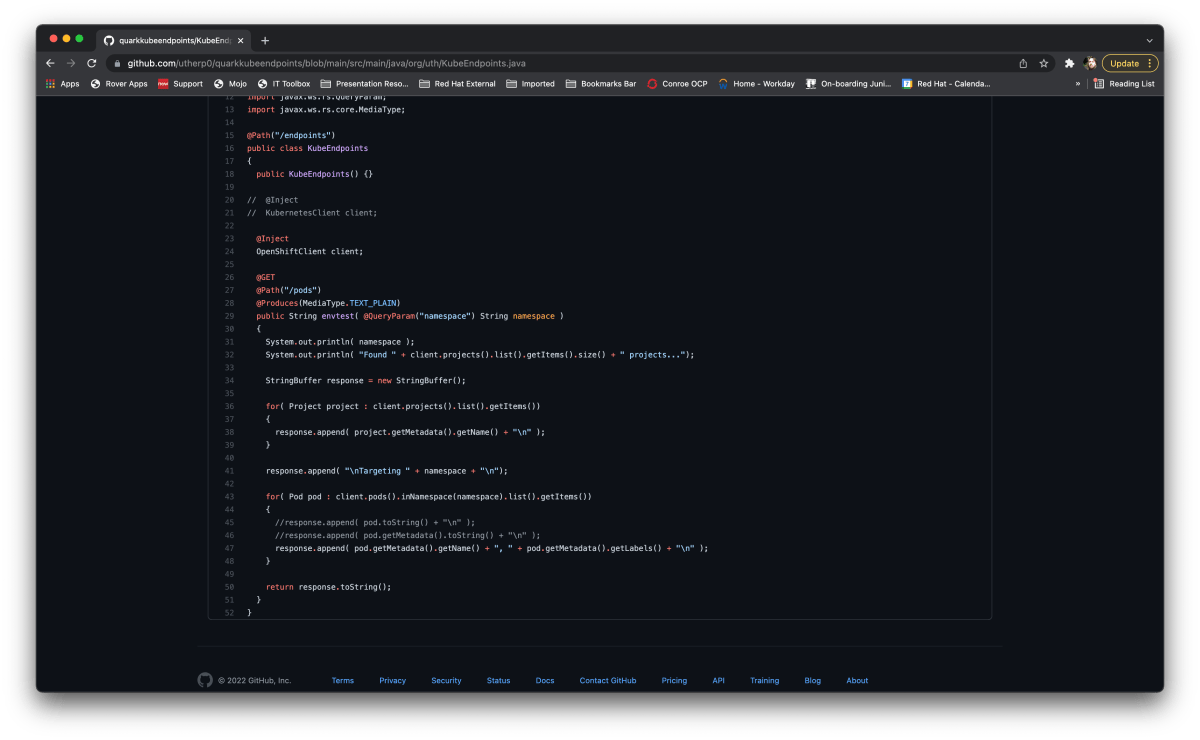
So, the code for the entire app looks like this:

@Path("/endpoints")
public class KubeEndpoints
{
  public KubeEndpoints() {}

//  @Inject
//  KubernetesClient client;

  @Inject
  OpenShiftClient client;

  @GET
  @Path("/pods")
  @Produces(MediaType.TEXT_PLAIN)
  public String envtest(@DefaultValue("default") @QueryParam("namespace") String namespace, @DefaultValue("false") @QueryParam("list") boolean listProjects )
  {
    System.out.println( namespace );
    System.out.println( "Found " + client.projects().list().getItems().size() + " projects...");

    StringBuffer response = new StringBuffer();

    // Only render the project list if the parameter indicates to
    if( listProjects )
    {
      for (Project project : client.projects().list().getItems())
      {
        response.append(project.getMetadata().getName() + "\n");
      }
    }

    response.append( "\nTargeting " + namespace + "\n");

    for( Pod pod : client.pods().inNamespace(namespace).list().getItems())
    {
      //response.append( pod.toString() + "\n" );
      //response.append( pod.getMetadata().toString() + "\n" );
      response.append( pod.getMetadata().getName() + ", " + pod.getMetadata().getLabels() + "\n" );
    }

    return response.toString();
  }
}

A little gotcha – because the app uses an @inject it must have a parameterless constructor, which isn’t added by the Quarkus code generator.

What I really like, and where I think this is massively powerful, is the DSL style object interface the OpenShiftClient provides. If you look at the code extract for iterating through the Pods in a project, for example:

    for( Pod pod : client.pods().inNamespace(namespace).list().getItems())
    {
      response.append( pod.getMetadata().getName() + ", " + pod.getMetadata().getLabels() + "\n" );
    }

I really like the client.pods().inNamespace(xxx).list.getItems() – it’s a little verbose but it gives you, without having to parse the JSON returned from the underlying API calls, the ability to interact directly with the Object model from OpenShift.

If you scan the JAVAdoc for the OpenShiftClient at https://www.javadoc.io/doc/io.fabric8/kubernetes-model/1.0.12/io/fabric8/openshift/api/model/package-summary.html they’ve done a great job in exposing the full Object model for OpenShift.

For me the ability to programatically examine and create/modify the Objects is a gateway to doing some seriously cool stuff. The first question, of course, is why?

So, the concept of Operators raises it’s head here – my next target for a demo is to extend this so I have a Quarkus based Operator that monitors named Projects and automatically updates any created Pod with additional labels. This kind of functionality is really useful for production systems and is much more lightweight for things like label compliance that, say, ArgoCD (which I also love but for different, more ops-y reasons).

Anyway, I hope that made sense; the example can be downloaded from the Git repo and, if you have pre-logged on to an OCP cluster (via oc) you can just run the app up and it will standup an endpoint on http://localhost:8080/endpoints/pods – a full example of this is http://localhost:8080/endpoints/pods?namespace=sandbox&list=true and the output looks like:

Right, back to playing with it…….