Categories
Uncategorized

Interlude – Kubernetes Koncepts….

Ahh, Kubernetes. I love Kubernetes; well, kinda. It’s a complicated but very well designed and written piece of software that appeals to all the old-school Object Oriented neurons in my head while making the rest of my mind go ‘what is happening?’.

Aside from the mad name (which is pain to spell if you have to type it more than one hundred times in a design document/slide deck, hence the casual abbreviation to K8S which I will, thankfully, use from now on) the whole K8S thing really appeals to me; mostly from a design perspective as when you get under the covers, which is what I will (probably badly) try to explain in this post, it’s deliciously simple and clever.

However, as anyone who has battled to install and maintain a non-OpenShift version (excuse the flag waving, I’m a massive OpenShift fan and would be even if I wasn’t an employee of Red Hat), “Kubernetes is Hard (C)“.

When I first delved into it as part of OpenShift 3 it was a complete mystery to me, so I spent a little bit of time reading the design documents for it and after that…..it was still a mystery to me.

But then I started to use it, or more appropriately, I started to craft the YAML for K8S objects as part of the OpenShift demos I was giving. And then, when CoreOS produced the brilliant Operator Framework, which I will also have a stab at explaining in this post, it suddenly became clear as to what K8S was doing under the hood and how.

So, let’s start with the basics; K8S/OpenShift are actually three things. You have a control plane, which you as a User talk to via the RESTful APIs provided. You have a brain, which contains the ideal state of everything that K8S maintains (more in a second) and you have Workers, which are nodes where ‘stuff runs’. Your applications run on the Workers; we’ll leave it at that for now and come back to it in a sec.

So, with the brain of K8S; this contains a set of Objects. These Objects are of a set of defined types; every object in the brain has to one of these types. Easy example; you have types of ‘oranges’, ‘lemons’ and ‘limes’. In the brain you have instances of these, But the brain, in this case can only have Oranges, Lemons and Limes.

When you interact with the control plane, you can create, modify or delete these objects. You do not interact with the objects; you ask the control plane to operate on those objects.

And this is where it gets cool; so, for every object that the control plane supports (in our daft example oranges, lemons and limes) there is a Controller – put simply this is a while-true loop that sits in the control plane watching the incoming requests for any mention of the object it owns; in our pithy example the control plane would have an orange controller, a lemon controller and a lime controller.

When the control plane receives a request the appropriate controller grabs it; the controller can create the objects, change the state of the objects and delete the objects within the brain. When an object is created, modified or deleted within the brain the control plane will act to reconcile that state change; physical actions are performed on the Workers to reflect the required state in the brain.

Deep breath. And this is what makes K8S so cool; each and every object type has its own control point, the brain reflects the state as required by the controllers and the combination of the control plane and the Workers realise those changes,

Now, with the Workers there’s a cool little process that sits on every one called, cutely, a Kubelet. This is the action point; it takes demands from the control plane and physically realises them, and reports back to the control plane if the state deviates from the state the brain wants.

This fire-and-forget, eventually-consistent distributed model is a wonderfully architected idea. It takes a while to get your head around it but when it clicks it’s a wonderful ‘oh yeah…..’ moment.

So, talking a little more technically – when you talk to the control plane you send object definitions via a RESTful API. K8S uses the object definitions to decide which controller to inform (not quite the way it works, think of it as a event/topic based model where al the controllers listen on a central bus of messages; the type of message defines which topic the event lands in, the controllers take the events off the topics – interestingly the reconciliation process works identically; responses from the kubelets arrive as events as well; the whole system works around this principle which is why it is so well suited for the distributed model.

And this is where Operators come in; Operators were the last piece in the puzzle to making K8S extensible without breaking it. I’ll give an example of this from personal experience; OpenShift 3 was a really nice enterprise spin of K8S; Red Hat added some additional objects for security, ingress and the like and to do that it had to produce Controllers for those objects and inject them into the core K8S.

This was problematic; K8S, as an Open Source project, churns a lot; innovation is like that, so to produce a stable version of OpenShift a line in the sand had to be drawn; the K8S version would be taken, the new controllers added to the code base, the binaries spun, tested, released. And every time a new version of K8S dropped the whole process would need to be repeated. In essence a Frankenstein K8S would have to be brought to life every time OpenShift wanted to onboard a newer version of K8S.

So CoreOS came up with this incredible idea for allowing Custom Controllers to be written and executed that ran as applications on K8S as opposed to being embedded in the core controllers. In English lets say we add a Pineapple object to our K8S knowledge; in the old days we’d have to add a controller into the control plane, effectively polluting the codebase. Now we run an Operator that sticks up a flag that says ‘anything Pineapples is mine!’.

Now, when the control plane receives any object requests around pineapples they don’t go into the event bus for the K8S controllers but instead are intercepted and processed by the Pineapple Operator; it uses the brain as the controllers do, but only to store state information about Pineapples.

This clever conceit meant that suddenly your K8S implementation could handle any new Objects without having to change the core controller plane.

It gets better – the entirety of OpenShift 4.x is implemented as Operators (that operate at the Cluster level). So all the good stuff OCP adds to K8S is done without impacting or altering the core control plane.

I like it a lot because the mechanisms by which Operators work means I can write Operators, in my favourite language, JAVA, which exist outside of the OpenShift cluster; the Operators announce themselves to the control plane, which registers the match of object types to the Operator, and then sit and listen on the event bus – they don’t run *in* OpenShift at all, which is great for testing without impacting the cluster.

One last thing on Operators – how many times have you had this issue when deploying an application?

Me: The application won’t start when I deploy the image?

Dev: Yeah, you need to set environment variables I_DIDNT_TELL_YOU_ABOUT_THIS and WITHOUT_THIS_THE_APP_BREAKS

That little nugget of configuration information lives in the Devs head; there’s nothing in the image that tells me it needs those (we developers tend to get over-excited and documenting stuff is last on the post-it list of jobs we don’t really want to do).

The beauty of Operators is, when written properly, they can encapsulate and automate all of those ‘external to the app’ configuration components; the job of an Operator, as with any controller in K8S, is to configure, maintain and monitor the deployed objects/applications – now a dev can write a quick Operator that sets up all the config, external linkage and the like that is essential to the application, and the Operator will enforce that.

Day Two ops and all that lovely CICD goodness……

Anyway, thanks for sticking with this stream of consciousness; I needed to do it as part 2 of the Knative blog posts talks about Operators…..
Categories
Uncategorized

Fun with Knative (part 1)

Serverless. A term that used to make me shudder whenever it was mentioned for some unknown reason. The literal part of my brain really doesn’t like to hear ‘serverless’; it sounds like whatever compute you are using is magic. I’ve been told off a couple of times in meetings as referring to it as ‘unicorn’s arse’ in jest; like Cloud is ‘someone else’s machine’ serverless is effectively ‘someone else’s compute’.

Any, I digress, which I do a lot. There’s a Kubernetes project called knative which does some very, very clever stuff around, well, ‘serverless’ for lack of a better term, and as it is now supported in OpenShift I found myself wondering how to demo it in a such a way as to be visual appealing and explanatory of what it was doing.

But what is it?

Glad you asked. So, to put it very simply, knative (serving, I’ll explain the differences later) autoscales your application down to zero copies.

That may not sound exciting; you can scale an app down to zero yourself, but that’s not the point. What it does is actually really cool; OpenShift offlines the container/pod until it is needed – a call into the application forces OpenShift to restore the container and serve the request, then wait for an inactivity timeout and then offline the container.

How is that helpful? Put it like this; say you have ten webservices as part of your application that you provide to the outside world. The nature of running these in a Kubernetes/OpenShift system means you have to have at least ten Pods, where the Pod is the application (and the smallest atomic deployable component), running at all times. Now say that 9 of those 10 applications were called once a day, and the 10th was called once a minute. OpenShift/Kubernetes needs to keep all ten up all the time in case they are called. These Pods are resident, they take up resource, and they are not being exercised (9 of them) for the majority of time they are active.

So, if you offline 9 of them and make them knative applications, OpenShift will remove them from the platform while they are not being used, and restore them when they get traffic. So, for the vast majority of the 24 hours, you have one active Pod and momentarily others for the duration of their call and the timeout period.

Which is WAY more efficient; and that extra space can be used for other applications instead. Everything about Containerisation is about efficiency and this is just the next step.

How does it actually work?

So, a knative service behaves slightly differently to a standard application on OpenShift. A very quick introduction to how applications talk to the outside world – a Kubernetes/OpenShift platform has an internalised network, the SDN (software defined network), on which everything internal lives. Every aspect of OpenShift is a Pod itself and the way I describe it to customers is that everything that lives on the SDN has a doorbell, which is called a ‘Service’.

In actuality this Service is an internal IP address and this is where it gets cool – let’s say you’ve created a little webserver. You deploy that in OpenShift and it gets a Service which maps to, say, port 80 in the container. If you then scaled that up, let’s say because your webserver is getting thrashed and you need some more grunt, OpenShift will create additional replicas, which are Pods themselves. But it still retain a singular Service address – this IP now works as a load balancer over all the IPs of the replicas – the Service is a single consistent endpoint regardless of the number of copies of the application you are running.

But from an external perspective these Services/IP addresses are invisible. OpenShift provides a mechanism called ‘Routes’ which provides an externally consumable FQDN (fully qualified domain name) by which an external process can send traffic to the Service. These routes map to the singular Service points within the system; when traffic arrives at the OpenShift cluster via the Route it is forwarded on to the Service, and then to the Pod itself, load-balanced appropriately depending on the number of replicas.

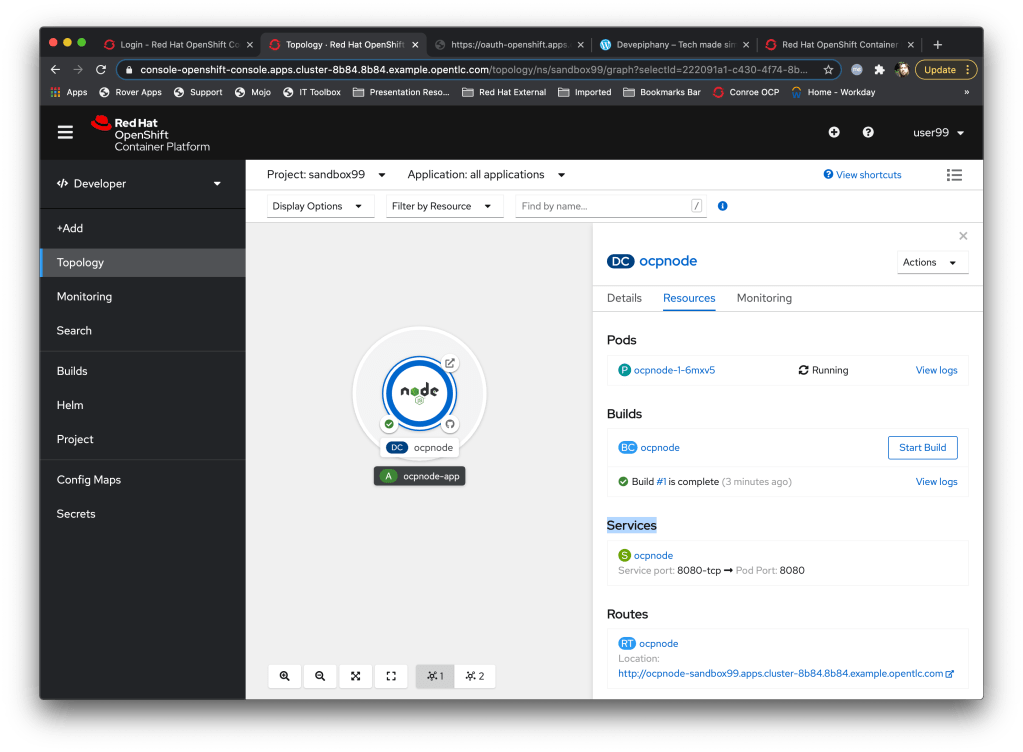
Pictured – for info I have highlighted the Services bit; note the Service (internal endpoint) and Route (external endpoint)

That’s all cool, but forget about it for now as part of knative services…..

Ingress works slightly differently for the knative Services for a good reason – if you scale the application down to zero replicas in a normal situation and call the Route/Service you will get an error; the traffic immediately flows to the Service which of course isn’t there (if you’ve used OpenShift this is the pretty formatted ‘Application is Unavailable’ page, which comes from the HAProxy load balancers).

This is not the behaviour we want, so for knative Services OpenShift has a different type of ingress receiver, one that triggers the reloading of the application if it is not there, or ingresses the traffic if it is.

This caught me out when building the demo that I’ll talk about later; I was getting FQDN endpoints being generated but, interestingly, no routes in the namespace.

So, to quickly summarise, when you create a knative service OpenShift sets up this endpoint (called a ksvc, or, tadah, a knative Service). When an external consumer sends a request to the FQDN provided as the ksvc endpoint the system will either reload the app, if it is not present, or pass the traffic into it, if it is. The endpoint has a timeout such that when no requests are received within a given period the application is offlined (the application is scaled t 0 replicas).

So, I’ll keep these blog posts as short as I can as I have a tendency to get excited – in part 2 I’ll describe the goals behind the demo (which is available if you can’t wait at https://github.com/utherp0/knativechain) and how to easily setup the knative serving stuff on OpenShift.

Before I stop, a quick mention of knative serving and knative eventing – OpenShift provides two ways to set knative Services up – one is driven by user requests through an FQDN (serving, what I’ve been whittering on about) and the other which is tying the behaviour to a queue of messages instead (eventing). You’ll see both when you install the Operator; I’m sticking with Serving for this demo as it’s easier to configure.

Categories
Uncategorized

Nice to see you here……

So, before I get started on blog posts with proper tech, just a quick introduction and an overview of what I’ll be doing here.

Yeah, I know, insert standard blog welcome here. But that’s not really what this blog is all about.

I love tech. I also love creating stuff, notably coding although with the lockdown and overall lack of any urge to do anything other than breathe and obsess about the latest piece of bad news, I’ve found it hard to do anything.

Hence, in some part, this blog.

As I said, possibly badly, in the introduction, my goal of this blog is to try and share some of the cool new tech in a way that makes sense to us developers; we are at an interesting point in the industry where the momentum of creation of new tech is far outstripping actually using it – this norm was coming into ascendency when I moved out of the career of producing software for a living and into vendor space. The advent and succession of Open Source and proliferated a massive amount of very specialised technologies, a lot of which is done purely to solve pragmatic problems.

This deluge of tech is a nightmare for the day-to-day dev. We all like our comfort zones but nowadays the stuff seems to change on a daily basis. I talk about some of the tech I was proud to have mastered and most people glaze over and look at me like I’ve just dropped a bus pass – STRUTS, JSP, JSF, ECMAScript, OpenVMS, the list is endless.

But the problems the new tech solves are basically the same, and that’s where it is fun to just dig down and find them.

I’ll give a nice example of this, pre-empting an blog post or two – we now have OpenShift Virtualisation, a technology that runs VM images directly on the Kernel of a Worker Node using a wrapper/launcher container; it effectively is running a VM as (or rather in) a container. Now that sounds nuts until you look at some of the topologies people now have for their apps; I dealt with one customer who had a transaction system comprising a backend database, which for licensing reasons couldn’t be containerised, and a frontend system written using .NET Core, which could.

They had effectively two orchestration systems for their end-to-end product, a Container orchestration system for their frontend/Ux and a Virt orchestration system for their old school database backend.

And, due to a change in the law, they had to change the schema of the database and the text/entry points on their system; it was a popular system and they couldn’t afford a huge amount of downtime, but because of the physical separation of the components they couldn’t do a single point rollout of the changed frontend and the backend; they literally had to take their 24 hour available system offline for a good amount of time to respin the VMs and release the frontend simultaneously. And it involved two separate and completely disparate control systems.

So, moving the VMs into OpenShift they could orchestrate a release of both the DB and the frontend simultaneously with minimal downtime (unlike the standard Containers you can’t really do a rolling deployment of the VM but the action of rollout was much simpler and single-point controlled).

Anyway, this blog will have a number of fun tech articles that hopefully explain the new stuff in a way that I can understand it; if you have any questions please add a comment…..